
InstantExhibit+
Goodbye, paper. Hello, digital.
Facilitating exhibit sharing, storage and management for ongoing, document-intense cases has never been easier.

InstantExhibit+™ provides a secure online repository for parties to upload exhibits electronically both before and during depositions, in addition to maintaining a central digital collection of exhibits for ongoing, complex, document-intense matters. Whether participants are in the same room or participating via a remote deposition, everyone has centralized access to the digital repository to view and examine introduced exhibits. This digital repository alleviates excess paper exhibits, promotes organization and provides realtime access to exhibits for all parties.
- 24/7 online access to the repository
- Unlimited parties and users
- Private folders with restricted access
- Shared folders to view introduced exhibits
- Master exhibit folder updated and maintained by a dedicated U.S. Legal Support team for the duration of your case
- Compatible with all file types and individual file sizes up to 5 GB of data
- Robust security and compliance
- Deposition technician upon request to assist with exhibit introduction, annotating and more
A Closer Look at Digital Exhibit Storage and Sharing
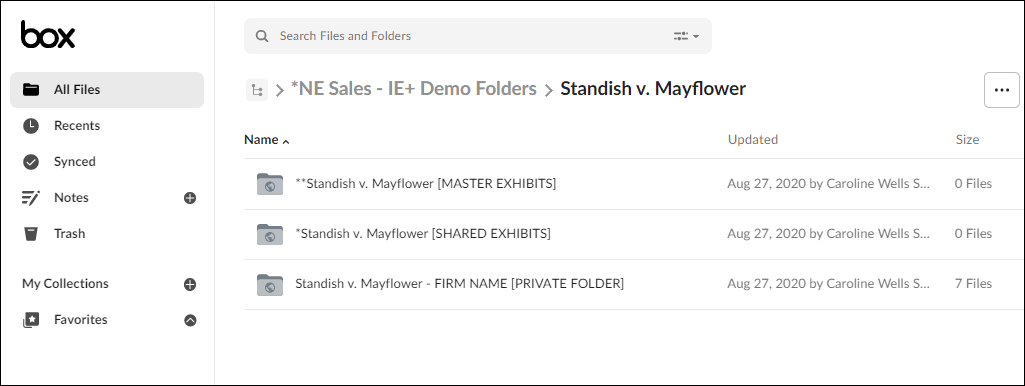
Case Folder View
Access the secure, central online repository to upload and view exhibits electronically both before and during depositions, as well as introduce exhibits in realtime during a deposition.
This is the online repository where all stamped exhibits for this case are accessible. They are managed and maintained for the duration of the case.
During a deposition, this is where introduced exhibits will be accessible.
Each firm has a private folder to upload potential exhibits before and during depositions. The documents within this folder are only accessible to those in your firm with permission. Documents in this folder are available for the duration of the case.
To view all of your cases within InstantExhibit+, click the All Files button.
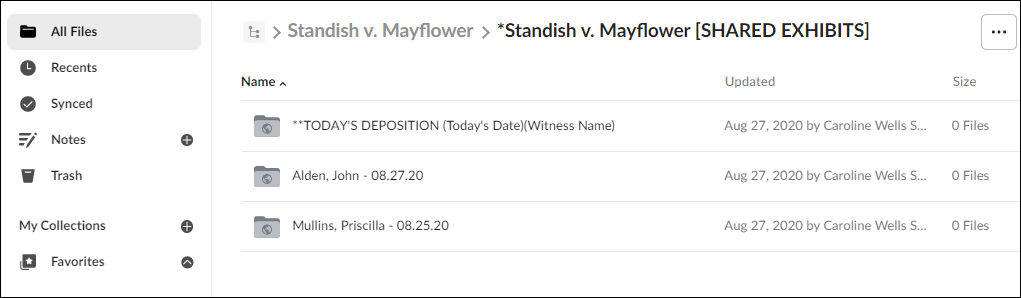
Today’s Deposition Folder View
This secure, private folder is where exhibits will be introduced in today’s proceedings and is viewable only by those active in the deposition.
This folder is accessible by all parties and is used to introduce exhibits during a deposition. Documents shared here are accessible for the duration of the case by counsel and are accessible during the deposition only for witnesses.
Sample deposition folder for use today. Please note that “today’s date” and “witness name” will be populated.
Post proceedings access to stamped exhibits populated with witness name and date. Documents shared here are accessible for the duration of the case by counsel.
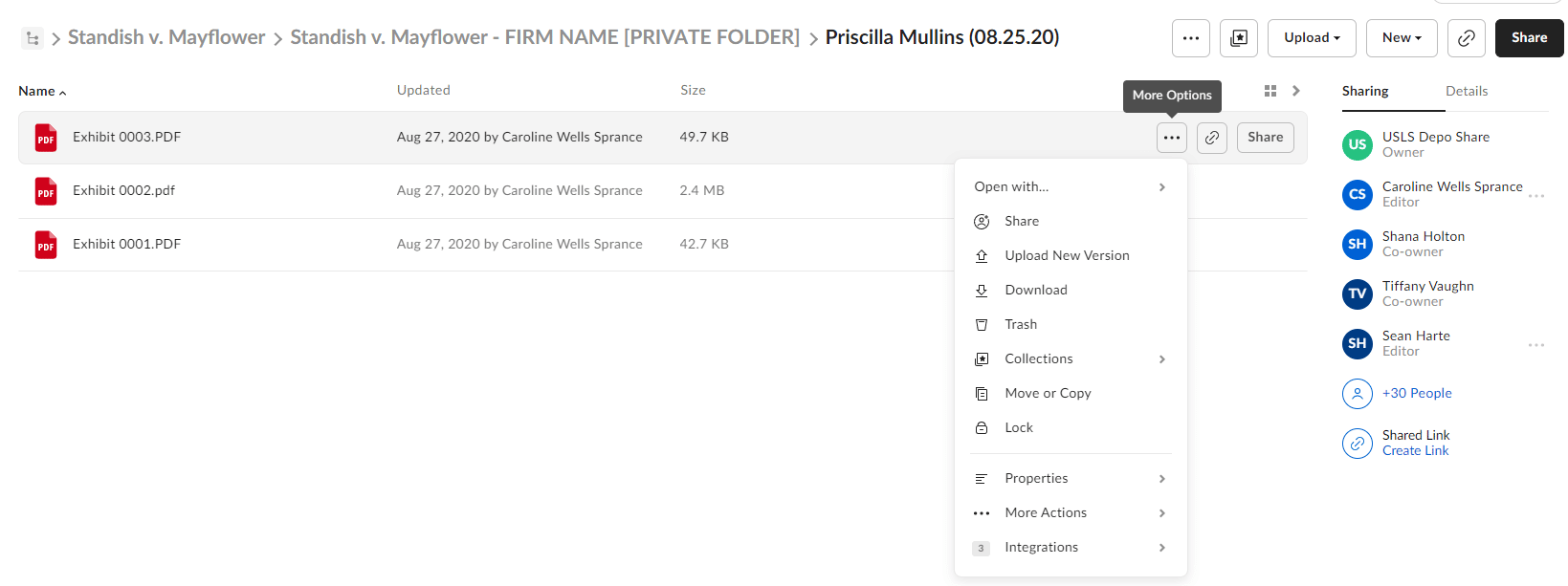
Private Folder View
This secure, private folder is where exhibits will be uploaded and stored. It is viewable only by those in your firm with permission.
Select the "more options" ellipses on the document you'd like to introduce. Click "copy" and select the shared "today's deposition" folder. Select copy again to successfully introduce the exhibit.
All documents in your firm's private folder remain secure and are only accessible by those you choose to allow.
For organizational purposes, select new folder to create subfolders.
How InstantExhibit+™ Works
Each party has access to private exhibit folders where you can upload potential exhibits prior to or during the deposition. Private folders are protected with restricted controls, allowing only designated members of your team access to upload, download and view the contents.
Every deposition will have a shared exhibit folder for all parties to view exhibits introduced during the deposition. To introduce an exhibit during a deposition, simply copy the exhibit from your private folder into the shared folder to make it available to all parties in realtime.
Parties have ongoing access to all introduced exhibits for the duration of the case. View previously introduced exhibits within individual shared exhibit folders or within the master exhibit binder.